Critique Lab
Critique Lab
In June 2026, I started a personal build on a problem I kept losing to: Blood on the Clocktower games move faster than memory. Players forget claims, miss vouching chains, and lose to wolves who exploit the chaos. BCCopilot is the phone-shaped second brain I wanted at the table — a real-time tactical assistant that tracks the room and tells me what to do about it. Six weeks of solo vibecoding, one HTML file, fully bilingual, no backend.
Project Type
Vibecoding
Time
June 01 2026
Team
Solo
Focus
Gaming, Mobile
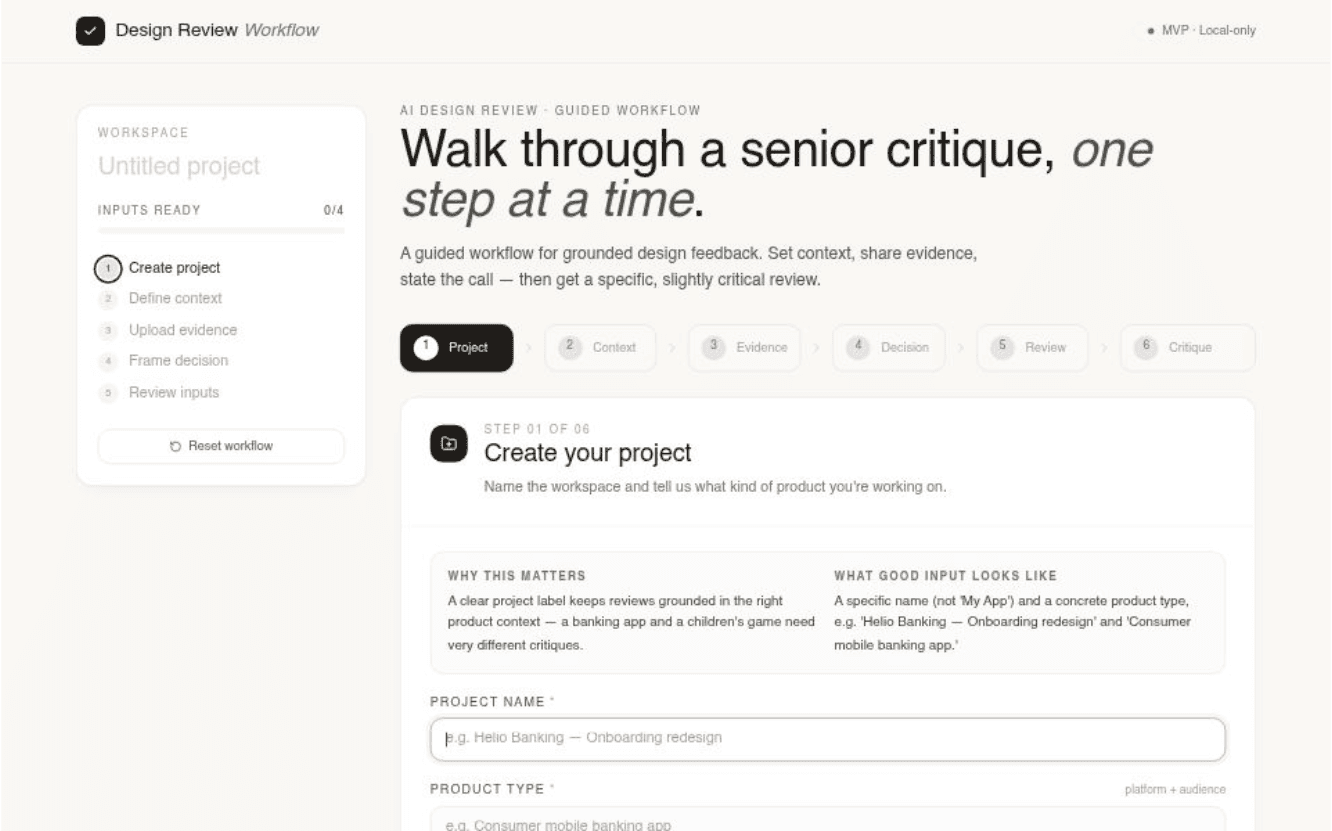
1.Define the brief
Start with a real brief, not a chat prompt.
Most AI tools open with an empty text box, which is exactly the wrong starting point — a blank prompt gets a blank answer. Step one asks for the two things that anchor every review afterward: what the product is, and who it's for. A children's game and a banking app deserve completely different critiques, and naming the product type up front makes the AI commit to that lens instead of hedging. The "why this matters" panel sits next to every step because the workflow is teaching the discipline as much as collecting the inputs.
2.Define the design context
Context is the thing AI critique tools skip.
This is the step that does the heavy lifting. Designers fill in target users, the main user goal, the business goal, and the constraints that actually limit choices — tech stack, regulatory, brand, time. Skipping these is what makes most AI feedback feel generic; including them is what makes a critique sound like it came from someone who's been in the project. The fields are deliberately small and specific. "Everyone" is not a target user. "Be successful" is not a goal. The structure forces designers to write the kind of brief they'd give a senior reviewer.
3.Upload design evidence
Show the screen, not just describe it.
A written description of a design is not a design. This step uses Claude's vision model so the AI actually looks at the screen — hierarchy, spacing, contrast, label clarity, where the eye lands. Drop in a screenshot, add notes if there's something you want it to focus on or ignore ("the placeholder avatar isn't real"), and the critique stops being about your description of the work and starts being about the work itself. This was the single biggest quality jump in development — text-only critiques felt theoretical; vision-grounded ones felt earned.
4.Frame the design decision
Name the decision you want challenged.
A vague decision gets vague feedback. This step asks for one specific call — "we moved KYC to the end of onboarding instead of the start" — and optionally the alternatives that were already weighed. Two things happen as a result: the AI critiques that decision instead of the whole screen, and designers articulate something they often only half-understand themselves. The exercise of writing the decision in one sentence is half the value of using the tool. The critique is the other half.
5.Review and receive feedback
Pause, then let the AI do its job.
Before generating, designers see all four inputs side by side as a single brief, with edit shortcuts back into any step. The pause is deliberate — output quality mirrors input quality, and reading your own brief in summary form is the fastest way to notice what's missing. When the inputs read like something you'd send a senior designer, the Generate button delivers what it promises: a structured critique in eight sections — project understanding, visual observations, decision fit, trade-offs, hidden risks and assumptions, accessibility and usability concerns, an alternative recommendation, and a confidence level. The confidence rating is the detail I'm proudest of. The AI tells you how sure it is and why — a blurry screenshot or vague decision returns a "low" rating with the reason attached, so the critique reads as a thinking partner with appropriate humility instead of a verdict handed down from on high.